Walkthrough
How to rent a plot and build a base in Rob Run
Rent a vacant plot, check which land document you need, and use the Planning Board inside your base to place a safe or workbench.
Quick answer
Find a vacant plot in an owned settlement and interact with its sign. Check the current document required for that tier before paying. Tier 1 rentals switched to documents in Kefir’s November 4 update.
Jump to the step-by-step instructions
Before you pay at the plot sign
- Settlement: Check that it has an owner.
- Plot: Find a vacant one and open its rental prompt.
- Document: Match the item and tier shown at the sign. The November 4 patch changed Tier 1 rentals to documents.
- Time left: Use the wipe countdown planner before paying close to reset.
Where do I get a Land Plot Title?
On the plot sign, check Conditions for the title it asks for. A Tier 1 gameplay example shows Land Plot Title (1/1). If the title is locked, open Shipments with H and look for the matching unlock. Then check the Black Market for the title itself before returning to the sign. Watch Ditech Gaming’s rental prompt at 1:49.
Why does ROB RUN warn that I have no home location?
The November 20 update added this warning when you try to buy contraband without a home location. Before spending, check your setup in the State you are playing in. If you still need a place to process cargo, check the plot requirements above and compare the workbench setup with selling cargo whole. Kefir’s November 20 patch notes.
After renting, see how to set up banking at your base and protect equipment from in-game raids.
Where is the Planning Board in Rob Run?
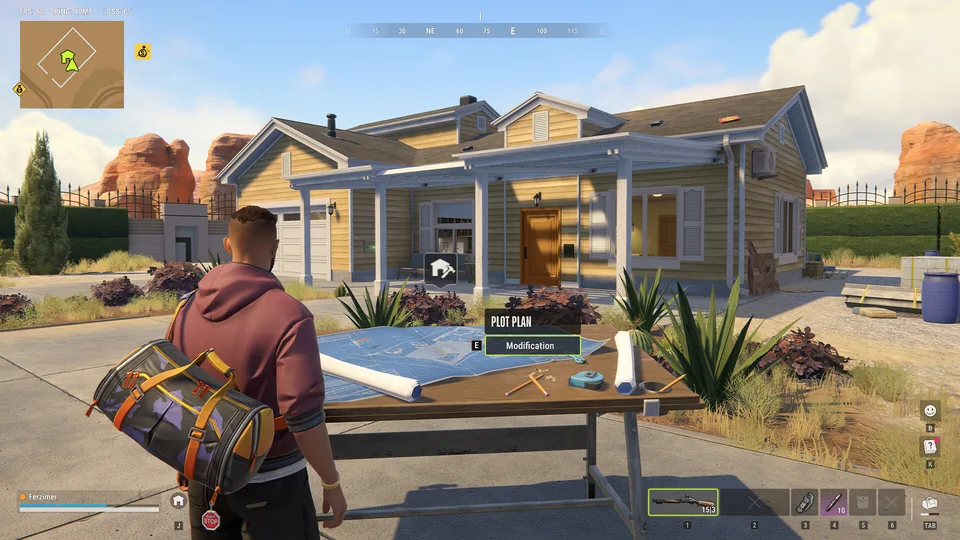
Look for the blueprint board on the wall inside your rented base’s house. In the starter trailer, look in the kitchen near the Black Market laptop. The board opens the house plan, where Modification lets you place boxed furniture. See the in-game trailer and Modification screenshots.
- Bring the boxed item in your bag. If you do not have it yet, check the item’s Shipments unlock and purchase requirements.
- Open the board and choose Modification.
- Drag the box from your bag to an empty slot of the matching type. Use a workbench spot for a workbench or a storage spot for a safe.
No compatible slots? Check whether the slot is occupied. The community reference reports that a Workshop adds workbench space and a Warehouse adds storage space. Check your building’s available slots before paying for another item.

Rob Run wipe calculator estimates your reset from its age or opening time.
1. Find an owned settlement and a vacant plot
Look for a settlement with an owner, then find the sign beside an unoccupied plot. Open the sign’s rental prompt to see the current requirement.
2. Check the document before buying it
Kefir’s November 4 launch notes changed Tier 1 land rentals from cash to documents. Its rental FAQ calls out Black Market documents for level 2 and 3 districts. Read the sign for the item and quantity it asks for on your server before buying anything.
3. Why can’t I rent this plot?
Check settlement ownership, plot availability, and the sign’s document requirement in that order. If you have an item from the Black Market, compare its name and tier with the prompt before spending more.
4. Set up for one repeatable activity
Sw1tchTV’s Tier 2 guide emphasizes steady income before an upgrade. Start with an activity you can already complete, then build the facility that helps that activity. If you play in a group, agree on who produces what before paying for duplicate facilities.
5. Check how much time is left before the wipe
Your plot and base reset in the Federal Raid. If the server cycle is nearly over, decide whether you can use the facility enough times to justify the cost.